How do you choose a CRM in Moldova for a small production or service business? We recommend starting from how you work, not from feature lists: for example, note the steps of a real order, who needs to see what, and the local connections you need (e-Factura, your bank, SMS). Then you can test two or three CRM apps on the same orders and score them against the same criteria. The monthly price matters, but the real cost also includes setup, data migration and your team's time.
This guide is for workshops and service companies: furniture, windows, gates, carpet cleaning, auto glass, dental labs. You will find the criteria, a scoring checklist and five options of different types, described only from information published on each vendor's official website. We say openly where Zafirok fits and where another tool may be the better choice.
In short
- It pays to choose by process: a sales CRM follows the client up to the contract; a workshop also needs to follow the order after the contract.
- Worth checking early: a Romanian and Russian interface, connections to e-Factura Moldova and your bank, and SMS to Moldovan numbers.
- Compare pricing models for your actual team: per user, a flat plan with users included, tiers by number of users, or a base plus modules.
- A useful test: 5–10 real orders, with the people who will use the tool daily, not only the administrator.
CRM or ERP: what a workshop actually needs
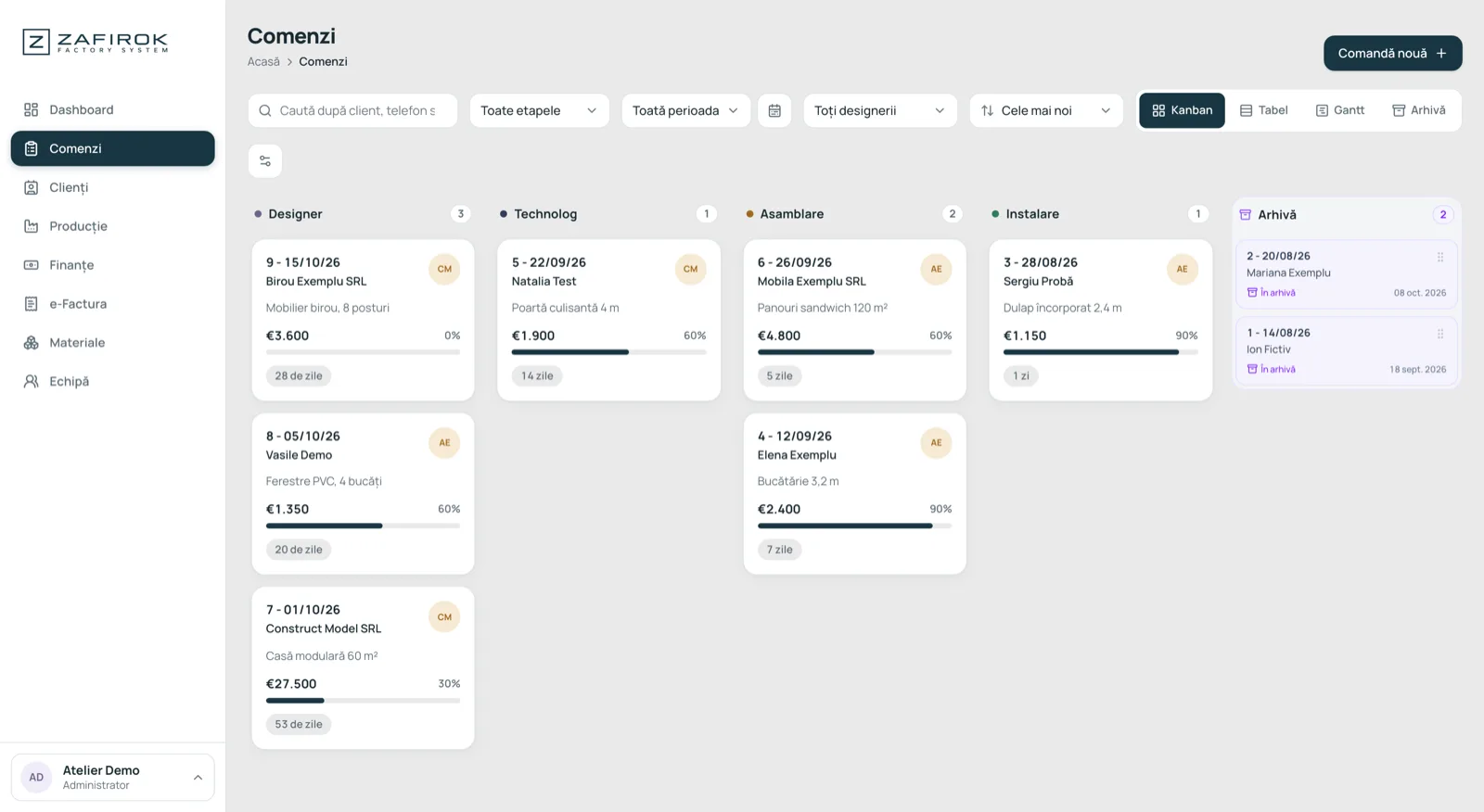
A CRM tracks clients and sales: who asked, what was discussed, what happens next. ERP organizes the company's resources: orders, materials, production, money and people. A workshop that builds furniture, windows or gates to order needs both, because much of the work starts after the contract: production, deposits, materials bought for that order, installation.
So a useful first question is where your work ends. If it ends when the contract is signed, a sales CRM may be enough. If that is where it starts, look for a CRM for manufacturing that follows each order through to handover and the final payment.
How to choose a CRM in Moldova: the criteria that matter
1. Fit with your industry
Check whether the tool already has stages, fields and screens close to your work. A universal platform can be shaped to almost any process, but shaping it takes time and sometimes a paid partner. A tool built for your industry starts faster but offers fewer tools outside it. Also ask whether its ready-made stages can be changed to match how you work.
2. Interface and support language
If some people on your team prefer Romanian and others Russian, check that each person can choose their language and that the translation is complete, not just the main menu. Ask which language support answers in, and through which channel.
3. Local connections: e-Factura, bank, SMS
Ask directly: is there a connector for e-Factura Moldova and for my bank? Does it only read data or also issue documents? Can I send SMS to Moldovan numbers? Who maintains the connection and what does it cost? An answer like “it can be done via the API” means someone has to build it.
4. Working from a phone
Installers, measuring technicians and drivers work in the field. Check that they can open an order, see the address, upload a photo and tick off steps from a phone. Also ask whether that needs an app from an app store or works directly in the browser.
5. Roles and access
Usually an installer does not need to see margins, and an outside collaborator does not need your whole client base. Look for roles you can set per module, the option to hide prices or client phone numbers, and a way to see the app exactly as a given role sees it.
6. Pricing model
Pricing can be per user, a flat plan with users included, tiers by number of users, or a base plus modules. Work out the 12-month cost for your actual team with the modules you need, and check whether taxes are included.
7. Data import and exit
Find out how you move clients from Excel or an old tool and who handles open orders. Also ask how you get your data out if you leave: a CSV or Excel export keeps you free to switch.
A scoring checklist for two or three CRM apps
We suggest the same list for every tool, as an example you can adapt. You can give each criterion 0 to 2 points (0 = missing, 1 = possible with workarounds or extra cost, 2 = works directly) and multiply by a weight from 1 to 3, depending on how much the criterion matters to your business.
- Pick 5–10 real orders from last month, including a difficult one with changes and staged payments.
- Enter them in each tool during the trial, with the people who will use it, and note how long it takes until the first order looks right.
- Answer the questions below and add up the weighted score.
- Use the score to support the decision, together with the opinion of the people who will use the tool every day.
- Can I set up my own order stages without programming?
- Can I see the deposit, payments received and the balance due on each order?
- Can I link purchased materials to the order they were bought for?
- Can the field team work comfortably from a phone?
- Does everyone get the interface in their language, Romanian or Russian?
- Is there a connection to e-Factura Moldova and my bank, or will I work manually?
- Can I send SMS to clients on Moldovan numbers?
- Can I hide prices and client data from certain roles?
- What does it cost over 12 months for my team, with the modules I need and taxes?
- How do I import clients, and how do I export my data if I leave?
It pays to choose the tool by your most complicated order, not by the smoothest demo.
Practical tip
Five options of different types: what the official websites say
Below are two international platforms, a local CRM, a trade and inventory service, and Zafirok, described only from the vendors' official pages as checked on 22 October 2026. Prices can change, so check them before you decide. The order is not a ranking.
Bitrix24: a universal platform with many tools
Bitrix24 combines CRM, tasks and projects (Kanban, Gantt), chat and video calls, calendars, websites and online stores, automation and HR tools. Bitrix24 Market lists more than 840 apps and integrations, and there is an On-Premise version for companies that want their own server. The Free plan is for 1–2 users; paid plans have a flat price per organization with a set number of users included. For example, on the Europe region pricing page, Basic costs €49 per month billed annually (€69 billed monthly) and includes 5 users.
It suits teams that want one platform for sales, tasks and internal communication and have the time, or a partner, to set it up. Bitrix24's manufacturing page describes inventory across multiple warehouses and suggests working with a partner for implementation and customization.
Zoho CRM: a configurable sales CRM, priced per user
Zoho CRM has a free edition for up to 3 users and paid editions priced per user. Standard costs 14 USD or EUR per user per month billed annually (20 billed monthly), and the page states that local taxes are added. The Professional edition includes inventory management: invoices, sales and purchase orders, products and vendors.
The interface is fully translated into 28 languages, including Russian. Romanian, including the Republic of Moldova variant, is listed among partially supported languages, where system elements stay in the default language. Zoho CRM suits companies with a clear sales process that want automation, reports and integrations and have someone to configure it.
CRM.md: a universal CRM from a local vendor
CRM.md presents itself as a universal CRM for companies across industries in Moldova. Its website describes leads from website forms, a sales funnel, clients, generated invoices, quotes and contracts, payments, tasks, projects with a Gantt chart, products and services, reports and a free personal area for clients. Plans differ by number of users: from €15 per month for 3 users, with 25% off for annual payment; there is also a one-time payment option of €2,500.
Personalized implementation (setup, integration with existing tools, training) is offered for an additional fee. CRM.md suits service and sales companies that want a local vendor, quick quotes and invoices, and simple pricing.
MoySklad (МойСклад): trade, inventory and production
MoySklad is a cloud service for trade and production: purchasing, inventory, production recipes (tech cards), production tasks and finance. On moysklad.ru, prices are in rubles, with a 14-day trial and a limited free plan (up to 5 users, one legal entity, and 100 each of products, counterparties and documents); features such as CRM or Production are also sold as separate paid options.
The site is built around Russian requirements (cash registers under 54-FZ, EGAIS, mandatory product marking) and points to separate sites for Kazakhstan and Uzbekistan; its pricing page says that payment with Visa or Mastercard cards issued outside Russia is possible at the tenge prices. Ask the vendor on what terms it works with a Moldovan company. It mainly suits businesses that sell goods from stock or manufacture products using tech cards.
Zafirok: CRM and ERP with ready-made industry set-ups
Zafirok is a web app for small and medium production and service businesses, with set-ups for 12 industries, from furniture and windows to carpet cleaning and dental labs. The interface is available in Romanian, Russian and English.
The Standard package costs $9 per month and includes the administrator account; an industry module adds $10 per month, and each active employee $3 per month. “Finance and payroll” (+$5 per month), “Warehouse” and SMS packages are optional extras priced separately, as shown on the pricing page; the e-Factura and Bank modules are activated in the app and cost $5 per month each.
How Zafirok helps
If Zafirok is still on your list after the checklist, here is what to check during the free trial period:
- Ready-made stages for your industry, which you can rename in “Kanban settings”; Kanban, Table and Gantt views; and checklists per stage (Settings → Workflow).
- Money per order: payments recorded as 60%, 30% or 10% advance or 100%, “Left to collect” on the order page and the “Daily balance” cash register; more in our guide to the Finance module.
- Materials and production: supplier invoices assigned to an order or a warehouse, a “Material estimate” (planned vs bought) and production flows with quality control.
- Moldova: received and issued invoices from e-Factura, read-only; statements from MAIB, ProCredit Bank and Victoriabank (Victoriabank is activated together with support), pulled on demand with “Sync statements” and matched to orders manually. Matching does not change the order's paid amount: the payment is recorded separately in Finance.
- SMS: one automatic message when an order is ready, sent through Zafirok or your own sms.md account.
- Team: 6 default roles, access per module (Hide / View / Edit), hidden prices or phone numbers and a “View as this role” button; see team and roles.
- Phone: the same web app, which you can install from the browser; there is no app in the app stores.
- Data: clients are imported from CSV or XLSX with column mapping (requires the Warehouse module); the Zafirok team prepares the import of open orders on request.
The stages, checklists, roles and SMS text prepared for your industry are a starting model: each company configures them to match the way it works. If you prefer, the Zafirok team can do the setup for you and help move your data, which is worth factoring in when you choose. Write to us via the contact page or create an account.
Limits to know: Zafirok does not issue invoices in e-Factura, initiate payments or match bank transfers to orders automatically. It has no manual, bulk or reminder SMS, and no quote module, client portal, emails to clients or cash-flow forecast. You cannot export clients, orders or the payments in Finance; “Export CSV” exists only in Materials, e-Factura and Bank.
When another tool may fit better
- You want one platform for sales, tasks, internal chat, video calls and a website: Bitrix24 covers more ground than Zafirok, where internal chat is marked “Coming soon”.
- You sell mainly through campaigns and automated lead follow-ups: Zoho CRM and Bitrix24 have dedicated marketing and sales tools.
- You need sales quotes and a personal area for clients: CRM.md describes both; Zafirok has neither.
- You hold a lot of stock and sell goods: a tool built for trade and inventory may fit better than one built around one-off orders.
- You want to host the software on your own server: Bitrix24 offers On-Premise; Zafirok is used as a web app.
- You want to issue e-invoices directly from the CRM: Zafirok only reads e-Factura, so look for this feature explicitly with another vendor.
Frequently asked questions
What is the best CRM for a small business in Moldova?
There is no answer that fits every company. For a workshop doing custom jobs, stages, payments per order and the field team matter most; for a sales company, the pipeline and automation do. Use the scoring checklist and test on real orders.
Is a free CRM enough?
To start with, it can be. Bitrix24 has a Free plan for 1–2 users and Zoho CRM a free edition for up to 3 users (checked on 22 October 2026). Check the limits: users, storage, included features and the cost of moving to a paid plan.
How long does switching to a new CRM take?
It depends on how much data you have and how clear your process is. A realistic start could be: define the stages, import clients, enter open orders and run a few days in parallel with the old system until the team trusts the new data. With Zafirok, our team can help with the setup and the import.
Does Zafirok issue invoices in e-Factura?
No. Zafirok reads received and issued invoices from e-Factura Moldova for one or more companies; issuing, signing and accepting stay in e-Factura. The module is activated separately in the app and costs $5 per month, with 3 free days that start after the first successful connection.
Sources
- Bitrix24 plans and pricing, Europe region – Free plan, flat price per organization, included users (checked on 22 October 2026)
- Bitrix24 Market and Bitrix24 On-Premise – app catalog and self-hosted version (checked on 22 October 2026)
- Bitrix24 for manufacturing – inventory and partners (checked on 22 October 2026)
- Zoho CRM pricing and editions – free edition, per-user prices, local taxes, inventory management (checked on 22 October 2026)
- Zoho CRM supported languages – fully and partially supported languages (checked on 22 October 2026)
- CRM.md, CRM.md prices and CRM.md implementation – features, plans, services (checked on 22 October 2026)
- MoySklad, MoySklad pricing and production features, in Russian (checked on 22 October 2026)
- Zafirok pricing (checked on 22 October 2026)