Software for a custom furniture workshop, in other words a CRM and ERP app, keeps everything about each order in one place: the customer, measurements and files, the approved revision, the current stage and its owner, the deadline, material costs and payments. Furniture order tracking works when anyone on the team can find this information in the order rather than on a colleague’s phone. It helps to start with a few clear rules (what “approved” means, who moves an order, which deposit you ask for before production), then choose the tool.
A kitchen can be well made and still arrive with a problem: an old drawing reached the workshop, a handle change got lost, or the installers did not know the building was only accessible in the afternoon. This guide follows one order from enquiry to handover: what to record at each step and where Zafirok can help.
In short
- Each order has one place for the customer, measurements, files, the approved revision, owner, deadline and payments.
- We recommend keeping customer estimates apart from confirmed measurements, labelling the approved revision and recalculating the price and deadline for every change.
- It helps if every stage has an owner and an exit condition; many workshops start production once documents are checked and the agreed deposit is in.
- Track the contract value, payments received, material costs and the outstanding balance separately, per order.
- Zafirok covers customers, orders by stage, production, materials, payments and commissions; design stays in your design software.
What software for a custom furniture workshop should do
CRM means customer relationship management; ERP means organising a company’s processes and resources. Whether you call it a bespoke furniture CRM or furniture manufacturing ERP, the useful part is the link between what you promised the customer and the work needed to deliver it, kept in the same order. Before choosing a system for furniture order tracking, check that it covers at least:
- orders by stage on a shared board, each with an owner and a deadline;
- files and photos attached to the order, including the approved revision;
- deposits, payments and the outstanding balance per order;
- material costs per order, taken from supplier invoices;
- checklists for measuring, delivery and installation;
- role-based access, so an installer sees only what they need.
What to record at the first enquiry
“I need a three-metre kitchen” only starts the conversation. Before arranging a site visit, record the type of furniture, the location and address, approximate dimensions, the budget discussed and the preferred installation period. It is best to keep the customer’s estimates apart from measurements confirmed on site, so a dimension given over the phone never becomes a manufacturing instruction.
It helps if every enquiry has an owner and a specific next step: a follow-up call for details, a measurement visit or a design clarification. In Zafirok, the customer appears on the Clients board (New, In discussion, Active), and the client timeline holds notes, calls, meetings, quotes discussed and tasks; when they come back for a wardrobe, the history gives you context.
How to turn measurements into usable documentation
A good measurement sheet describes the space, not just the wall length. Record openings, visible unevenness, socket and pipe positions, door clearance and the dimensions of built-in appliances. Overall and close-up photos support the drawing. For installation, note the floor, the lift, access and the room needed to carry in large panels.
Record the material, decor, thicknesses, hardware, finishes and any points still awaiting confirmation, with the measurement date and author. Zafirok orders have no dedicated furniture-dimension fields: you write measurements in the description or upload them as files and photos in the order’s Documents tab, with preview.
If information could change the dimensions, appearance, price or installation, add it to the order documents and check it before releasing the job to production.
A practical workshop rule
How to keep one approved revision for production
A project often has several drawings and renders, and everyone needs to be able to tell an early proposal from the version approved for manufacture. A simple naming convention helps, for example Kitchen_Project01_R03_approved, together with the customer’s confirmation listing exactly which files were approved.
For every change, we recommend recording the request and its effect on materials, price and timing and getting fresh confirmation before continuing the affected work, with earlier revisions marked as superseded. Approved files sit in Documents, but uploading a file does not by itself record the customer’s approval. You can generate the contract from the order as a PDF or Word file with the optional document generation module (Generare documente); the document number is an internal reference, not a fiscal series.
Which stages a furniture order needs
A practical flow: enquiry, measurement, design and approval, technical preparation, production, checking, delivery and installation, completion. It helps if every stage has an owner and an exit condition; for example, “ready for production” can mean checked documents and the agreed deposit received.
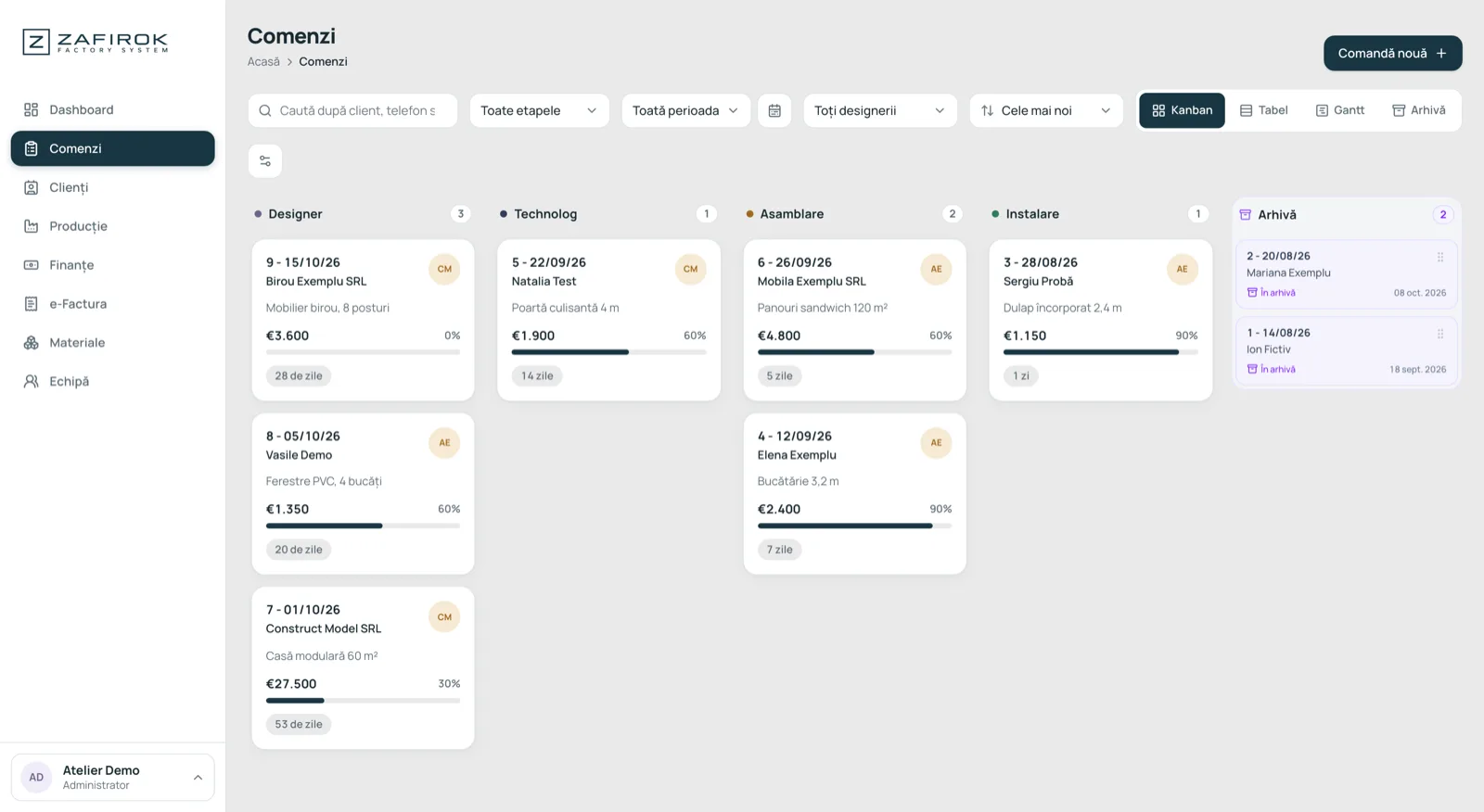
In Zafirok, the furniture configuration starts with the stages Design → Technical design → Assembly → Installation → Archive (Designer → Technolog → Asamblare → Instalare → Arhivă in the Romanian interface); the administrator can rename or add working stages in the Kanban settings (Archive stays last and cannot be renamed), and on each order you can pick a designer and a manager. Checklist templates (Settings → Workflow) add task lists to the order (for example, one per stage), and there each list or task can be given a person in charge.
The default stages also have two payment checks tied to stage names: an order cannot leave Design until 60% of its value is paid, or leave Installation until 100% is paid. If you rename these stages, the check no longer applies, which is useful if you work with a different deposit. See the bespoke furniture configuration and the separate custom kitchens configuration.
How to plan production and promise realistic deadlines
The installation date depends on design readiness, materials, the workshop’s workload and the installation team. It helps to separate the date the customer would like from the date the workshop confirms and to track the milestones in between: final documents, start of production, the check before loading.
In Zafirok, workshop work is tracked in the Production module: a production job linked to the order moves through the workshop flow (by default Preparation → Manufacturing → Quality control → Ready for handover). At a stage with a quality check, the check must be confirmed before the job moves on, and a problem is reported as a blocker (Warning or Critical) with a reason and, optionally, photos; the blocker holds the job until it is resolved. The production job does not move the order or touch payments. For orders with many steps, Gantt planning, switched on per order, links tasks through dependencies and compares planned cost with the budget.
Each order has a delivery deadline field, but the app does not plan workshop capacity automatically: if two complex kitchens fall in the same installation week, it is worth checking the team and the van early, and if something slips, giving the customer a realistic new date.
How to track deposits, payments and job cost
Contract value is not cash received, and cash received is not profit. For companies that keep their books in lei (MDL or RON), the contract value is entered in EUR, with the lei equivalent at the company’s own rate. In Zafirok, payments are added in Finance with “New payment” (Încasare nouă), choosing the order, a type (60% advance, 30% advance, 10% advance or 100%), a status of Paid or Unpaid, and a date; the order’s Payments tab then shows them with the 60–30–10 plan and the percentage paid.
Other costs, such as transport or outside services, are also recorded in Finance with “New transaction”, linked to the order, and appear in the order’s Expenses tab. The order’s side card shows profit, margin, the amount collected and the balance due. An unpaid payment with a date works as a planned receivable and appears in the Dashboard alerts (“Receivable”, with its due date) as soon as you record it, not only when it falls due.
Material costs come from supplier invoices. In the Materials module (Materiale), each invoice line goes to its order or to a warehouse, an item bought for two orders is split between them (Split line), and transport is spread over the goods. The materials estimate (Deviz de materiale) compares planned and purchased materials on each order and flags when the budget is exceeded. The Scan button reads an invoice from a photo or PDF and fills in the form, which you check before saving.
A hypothetical example in Moldovan lei: an order is priced at 60,000 lei and the workshop allocates 42,000 lei in costs. The difference is 18,000 lei, or 30% of the price. If rework adds 6,000 lei, it falls to 12,000 lei, or 20%. With a 60% deposit (36,000 lei), 24,000 lei remain to be collected. This is not net profit or a promised result: taxes and the company’s other costs change the final outcome.
How to pay the designer, technologist and installation team
In the furniture configuration, the percentage commissions of the designer and manager chosen on the order are created automatically when the order enters the Technical design stage (Technolog); if that stage is renamed or the order skips it, they are not created automatically. In the Commissions & m² tab you enter the square metres by hand, and the technologist’s and assembler’s pay is calculated from them.
Separately, Finance → Payroll (Salarii) lets you give any employee one or more pay rules: fixed monthly, hourly, by volume (for example per m²) or a percentage of the order value, not of the money received. Quantities are entered by hand, and a salary marked as paid becomes an expense in Finance. The app does not split pay automatically between members of a team.
How to close the order: delivery, installation, handover
Before dispatch, it is worth checking the components, fittings and documents the installers need, and confirming the address, contact person, access window and team; a delivery checklist stops the van leaving without a small but essential part.
When the order enters the stage you choose as “ready”, the customer can receive an automatic SMS with your text, once per order; payment reminders and bulk messages are not sent. After installation, record any remaining adjustments with an owner and a deadline, attach photos and update payments; the 100% check stops an order leaving Installation while a balance is due, but it does not check an order dragged on the board straight from an earlier stage into Archive.
How Zafirok helps a furniture workshop as CRM and ERP software
- Clients: a board by columns, search by name or phone, the client timeline and coloured labels.
- Orders: Kanban and Table views, configurable stages, files in Documents and checklists.
- Production and Gantt planning: workshop jobs with quality checks and plans with dependencies.
- Materials: supplier invoices split by order, the materials estimate and Scan.
- Money: 60–30–10 payments, payment checks in the default stages, expenses, profit, margin, commissions and payroll.
- Team: default roles, access per module and hidden prices where needed.
- Optional: document generation, website forms, Messages (Facebook and Instagram) and the “ready” SMS.
The stages, checklists, roles, production flow and SMS text are a starting model: each workshop sets them up to match the way it works. If you prefer, the Zafirok team can do the setup for you: write to us via the contact page or create an account.
Zafirok does not design furniture or produce cutting or CNC files; those stay in the workshop’s design software. It has no dedicated dimension fields, no quote module, no customer portal and no automatic capacity or material requirements planning (MRP).
How to start without complicating the workshop
- Pick 3–5 active orders, including one with an approved change and one with a deposit received.
- Agree the stages, who updates each order and whether you keep the payment checks on Design and Installation.
- Enter active customers and orders with their deadlines and payments already received.
- Attach the current documents, with one naming convention for revisions.
- Enter new supplier invoices in Materials and create a checklist for installation.
- After two weeks, check whether a new colleague can find the latest drawing, the reason for a delay and the balance in the order; then improve one rule at a time.
Frequently asked questions
Is order-tracking software worth it for a workshop with only a few people?
Yes, when information is split between people, messages and notebooks. We recommend starting with a few stages and simple rules, so every order shows its documents, owner and next step.
Does Zafirok replace furniture design software?
No. Zafirok organises customers, orders, production, materials, deadlines and money; design and manufacturing files stay in the workshop’s specialist tools.
Can I block production until the deposit is paid?
Partly. In the furniture configuration, an order cannot leave the Design stage until 60% is paid, or leave Installation before 100% is paid. The check is tied to the stage names (if you rename them, it no longer applies) and does not stop anyone starting a production job in the Production module; if you want that order of work, you can agree it as an internal rule. The Zafirok team can help with the setup (contact page).
Can I see the real material cost of each order?
Yes, if supplier invoices are entered in Materials with each line assigned to its order. The materials estimate then compares planned and purchased materials and flags overruns; the figures are only complete if every invoice is entered.
Read next: how to price a custom job, how to track customer deposits and balances and how to track supplier invoices by job and in stock.
Sources
- Salesforce: an introduction to customer relationship management
- Oracle: an introduction to enterprise resource planning