How to track customer deposits and balances comes down to one rule: every payment is linked to its order, with amount, date and status, so the balance due is visible at any moment without paper calculations. A method that works for many businesses: agree the instalments in the contract, enter all of them on the order right after signing, including those not yet paid, and check every week what is coming due. You can do this in a spreadsheet or in CRM and ERP software such as Zafirok.
This guide is for workshops and companies in Moldova that work to order: furniture, windows, gates, modular houses or carpet cleaning. At the end we show how to apply it in Zafirok and what the app does not do.
In short
- Instalments (percentage or amount, and when they are due) are best written into the contract and copied exactly onto the order.
- Every payment has four data points: order, amount, date and status (paid or unpaid).
- A future instalment is entered from the start as an unpaid payment, with the date you expect it.
- The balance due is calculated only from money actually received, not from promises.
- A useful rhythm: cash daily, due dates weekly.
Why money from deposits and instalments gets lost
Usually it is not the money that disappears, but the information about it. For example, an installer receives 2,000 MDL in cash and hands it over the next day, a bank transfer arrives without an order number, and after installation nobody is sure whether the last instalment was paid.
A notebook or spreadsheet works while one person receives every payment. When money comes in through the office, the installers, the driver and the bank, one simple rule helps: every payment is recorded on its order the same day, by whoever received it.
How to track customer deposits and balances: 6 steps
- Agree the instalments in the contract. Write the percentage or amount, when each one is due (at signing, before delivery, after installation) and how it is paid. For example: a 60% deposit, 30% before delivery and 10% after acceptance; the percentages depend on your business.
- Enter all instalments on the order right after signing. The deposit you received is recorded as paid; the other instalments are entered as unpaid, each with the date you expect it.
- When money arrives, update the existing instalment. Mark it as paid on the day the money came in, without creating a second record for the same amount.
- Match every bank transfer to the right order. Ask clients to put the order number in the payment reference and check the bank statement before marking the payment.
- Update the order value whenever something changes. If the client adds or removes items, confirm the new value in writing and recalculate the remaining instalments.
- Check regularly: cash and the day's payments daily, due instalments weekly, delivered orders that still have a balance monthly.
Balance due = current order value − money actually received. A transfer the client says was “sent” counts only once the money is in your account.
Rule of thumb
Example: tracking instalment payments on a 48,000 MDL order
A hypothetical example with round numbers, only to illustrate the calculation. A custom kitchen costs 48,000 MDL (Moldovan lei) and the contract has three instalments:
- At signing, a 60% deposit: 28,800 MDL, paid.
- Before delivery, 30%: 14,400 MDL, unpaid, with the agreed due date.
- After installation and acceptance, 10%: 4,800 MDL, unpaid, with the agreed due date.
After the deposit, the balance due is 19,200 MDL and the order is 60% paid. When the client pays the second instalment, the balance drops to 4,800 MDL and the paid share rises to 90%.
Now suppose that before installation the client asks for an extra cornice worth 2,000 MDL. The order value becomes 50,000 MDL and 43,200 MDL has been received, so the balance is 6,800 MDL and the paid share falls to 86.4%. If the change never reaches your records, at the end you will ask for 4,800 MDL instead of 6,800.
Terms the whole team should use the same way
- Deposit (advance): money received before work starts; it is often used to buy materials.
- Instalment: part of the price, paid at a moment fixed in the contract.
- Planned payment: an instalment not yet paid, with a due date.
- Balance due: the order value minus the money actually received.
Example checklist: daily, weekly, monthly
- Daily: the payments received that day, in cash and by transfer, are on the right orders, and the cash in the till matches the records.
- Daily: money received by installers or the driver is handed over and recorded the same day.
- Weekly: the list of due and overdue instalments, with who calls each client and when.
- If you tie payments to stages: before moving an order on, the agreed instalment has been received.
- When closing an order: the balance is zero, or the reason is written down (discount, complaint).
- Monthly: delivered orders that still have a balance, and discounts given verbally.
How Zafirok helps as CRM and ERP software
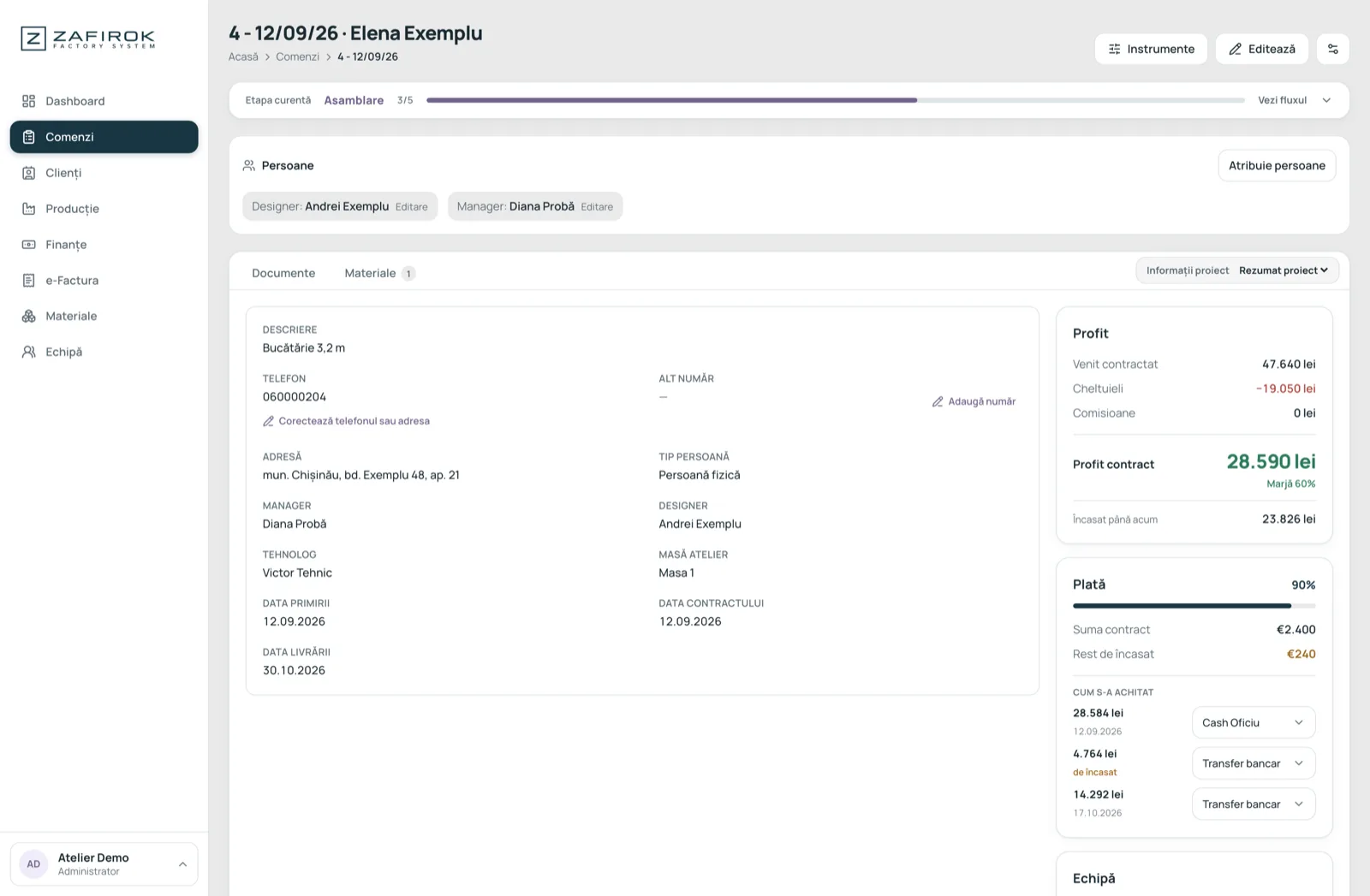
In Zafirok, every payment is linked to its order and the balance due is calculated automatically. At the time of writing the interface is in Romanian, so the labels below are given in Romanian with a translation. Here is what you can use in the Finance module and on the order page:
- “Încasare nouă” (new payment) in “Finanțe” (Finance): you choose the order, the type (“60% avans”, “30% avans”, “10% avans” or “100%”), the amount, the method, the status (“Achitat”, paid, or “Neachitat”, unpaid) and the date. Payments are not entered on the order page: the order's “Încasări” (payments) tab only lists them.
- Planned payments: an unpaid payment with a date works as an instalment to collect and appears under “Alerte” (alerts) on the Dashboard, with the order number and due date. When the client pays, you click “Achită” (pay) in Finanțe → Încasări: the status becomes paid, dated the day you mark it, so mark it on the day the money actually arrives.
- The “Plată” (payment) card on the order shows the percentage paid, the contract amount and “Rest de încasat” (left to collect). Only payments with the paid status are counted, so promises do not inflate the numbers.
- The “Profit” card shows the order's profit and margin. Its “Încasat până acum” (collected so far) line is the profit realised so far (payments received minus expenses and commissions), not the total collected.
- In Finanțe, the “Încasat” (collected) tile shows the money received in the chosen month or date range, and “De încasat (EUR)” (receivable) the total of scheduled instalments not yet paid.
- “Sold de zi” (daily balance) shows the money in and out for a day and “Rulajul zilei” (the day's turnover). “Închide ziua” (close the day) saves the day's balances, calculated from the records in the app.
The 60% and 100% checks in the default flow
In the configurations for furniture, kitchens, windows, gates and fences, modular houses, sandwich panels and factories, the “Încasări” tab shows a “Plan de încasare 60–30–10” (60–30–10 payment plan) bar and the paid percentage. In the default stages, two checks are tied to stage names: an order cannot leave the “Designer” stage until 60% is paid, and cannot leave “Instalare” (installation) until 100% is paid. If your business works with a different deposit, you can adapt the flow: once you rename one of these stages, its check no longer applies.
All of this is a starting model, not a rule: each company sets up its own stages, checklists and roles to match the way it works. If you prefer, the Zafirok team can do the setup for you: write to us via the contact page or create an account.
In the same configurations, the contract value is entered in euros and the paid percentage is calculated against it. Payments are recorded in lei: in “Încasare nouă” you can type the amount in euros and the app converts it to lei at the company's saved EUR rate, which you can adjust. We showed how the 60% and 100% checks work in a window company in the guide for PVC window companies.
For carpet cleaners: payment on delivery
Carpet cleaning businesses usually collect the money at hand-over. The driver confirms the delivery from “Preluări & livrări” (pickups and deliveries) and picks how the client paid (“Numerar”, cash; “Transfer”; or “Factură”, invoice); the amount comes from the order and does not change at the door. With an invoice, the amount stays to be collected on the order until you mark it paid in Finanțe. The “Livrat, neîncasat” (delivered, not paid) alert on the Dashboard flags orders handed over without payment.
What the app does not do
Zafirok does not send payment reminders to clients and does not generate a custom payment schedule automatically: you add the instalments yourself, as unpaid payments with dates. The app shows what is due; calling the client is up to your team. The automatic “order ready” SMS is not a reminder either: it goes out once, when the order reaches the chosen stage.
How deposits are treated in your accounts and for VAT is for your accountant to decide; this guide covers only the day-to-day tracking of payments.
Frequently asked questions
How do I record a cash deposit received by an installer?
We recommend recording it on the client's order the same day, with the cash method and the actual date, then hand the money over to the till. In Zafirok you use “Încasare nouă” in Finanțe with the method “Cash Oficiu” (office cash). At the end of the day, check that the cash matches the records.
What if the client pays more or less than the instalment?
Record the amount actually received, not the contract amount. The balance is calculated from what you collected; clarify the difference with the client and note it on the order.
How do I see every client who still owes money?
Enter every future instalment as an unpaid payment with a date; otherwise there is nothing to build the list from. In Zafirok, unpaid instalments appear under “Alerte” on the Dashboard with their due dates, and the “De încasat (EUR)” tile in Finanțe shows their total.
Can I work with a deposit other than 60%?
Yes. The 60/30/10 structure is only an example, and you enter the amount of each payment yourself. The 60% check is tied to the “Designer” stage in the default flow; if you work differently, you can reorganise the stages yourself or with help from the Zafirok team (contact page).
Does Zafirok send payment reminders to clients?
No. The app shows what is due and how much each client still owes, but it does not send automatic reminders. You call or message the client yourself.
Create an account and track deposits on every order