Piece rate pay for installers rewards the work actually done – square metres installed, pieces produced – and the sum is simple: quantity times the rate per unit. For installation and production crews it works well when the unit is easy to measure and the work is checked; where output cannot be measured, a fixed salary or hourly pay is usually fairer. Below you will also see how to apply each model in Zafirok, CRM and ERP software for small businesses.
We compare the four common models – fixed, hourly, piece rate and a percentage of the order – with hypothetical examples in lei. This guide does not cover legal obligations: employment contracts, taxes and social contributions are a matter for your accountant or lawyer.
In short
- Piece rate = quantity × rate per unit. It works when the unit is clear (m², pieces, linear metres) and verified.
- Hourly pay and fixed salary suit work that is hard to measure or steady in volume.
- An order commission is calculated on the order value, not on money received; you decide internally when to pay it.
- The Beginner, Intermediate and Advanced levels let you pay different rates for the same work.
- In Zafirok, quantities are typed in by hand, per month and per employee, optionally per order; there is no automatic split across a crew.
- Once paid, the salary automatically becomes an expense in Finance.
Piece rate, hourly, fixed or commission: the four models
- Fixed monthly salary: the same amount every month. Suits roles with steady or hard-to-measure work: warehouse, office, coordination. The risk: it does not reward productivity.
- Hourly: you pay for time worked. Suits repairs, diagnostics and jobs of unpredictable length. Works best with a clear record of hours.
- Piece rate (by volume): you pay for measurable output – m² of windows installed, doors fitted, panels produced. It rewards speed, ideally with rules on quality and rework.
- Percentage of the order: a share of the order value for people who sell or design (designer, manager). It ties earnings to order size, not to the effort of execution.
There is no single right model for the whole company. A window workshop might pay installers by piece rate, the service technician by the hour, the storekeeper a fixed salary and the manager a percentage of the order. It helps a lot when everyone knows in advance how their pay is calculated.
How to calculate installer pay on a piece rate
The formula is simple; the rules around it make the difference. Before the first calculation, we recommend putting rules like these in writing:
- The unit: m² of windows installed, a piece or a linear metre – ideally one unit per type of job.
- What counts: for example, only finished and accepted work, after a quality check or the client's signature.
- Who measures and who confirms the quantity.
- What happens with rework: how you treat redoing rejected work and how you pay for a change requested by the client. Check with your accountant or lawyer how the law applies to you.
- When pay is made: for example monthly, on a fixed date.
Hypothetical example: the installation rate is 45 lei/m². In October, the installer fitted 186 m² of accepted windows. Piece rate pay for the month: 186 × 45 = 8,370 lei.
Levels: same unit, different rates
A beginner and an experienced installer can earn different rates for the same unit. Hypothetical example for 120 m²: Beginner at 35 lei/m² → 4,200 lei; Intermediate at 45 lei/m² → 5,400 lei; Advanced at 55 lei/m² → 6,600 lei. Moving up a level should depend on clear criteria, not just length of service.
The crew: how to split the volume
When three people install together, the volume is shared between them. Zafirok does not split it automatically: you type in each person's quantity. We recommend agreeing the rule as a team before the job, not after.
Hypothetical example: a crew of three installs 240 m² on one order at 40 lei/m², which is 9,600 lei in total. Three ways to split it:
- By what each person did: 100, 80 and 60 m² → 4,000, 3,200 and 2,400 lei.
- By fixed shares of 40%, 30% and 30%: 96, 72 and 72 m² → 3,840, 2,880 and 2,880 lei.
- In equal parts: 80 m² each → 3,200 lei each.
Whichever you choose, in Zafirok you enter each person's share, for example 96, 72 and 72 m², and link it to the order. That keeps the connection between the pay and the job.
Hourly pay and fixed salary
For service work, diagnostics or jobs whose length cannot be estimated, hourly pay is fairer than piece rate. Hypothetical example: a technician at the Intermediate level, 75 lei per hour, 160 hours worked in a month → 12,000 lei. It helps if someone keeps the hours up to date, and in Zafirok you type them in at the monthly calculation.
A fixed monthly salary suits roles with steady volume. Hypothetical example: a storekeeper on 9,500 lei a month. In Zafirok, the “Fixed monthly salary” rule gives the agreed amount for the chosen month.
Order commission for designers and managers
An order commission is a percentage of the order value. Hypothetical example: the manager earns 3%, the order is worth 48,000 lei, so the commission is 1,440 lei.
Note that in Zafirok “% of order” applies to the order value, not to money received. If the client has only paid the 60% deposit (28,800 lei), the calculation still shows 1,440 lei. So you decide internally when commission is paid, for example after full payment, and can plan the payment for that date.
In the bespoke furniture setup, designer and manager commissions are created automatically, as a percentage, when the order enters the technical design stage (Technolog), and the technologist and assembler can be paid per m². You see them in the order's “Commissions & m²” tab. More about the setup for bespoke furniture.
Working with pay in the Zafirok app, step by step
- Add people under Team. An installer can be an employee without a login to the app.
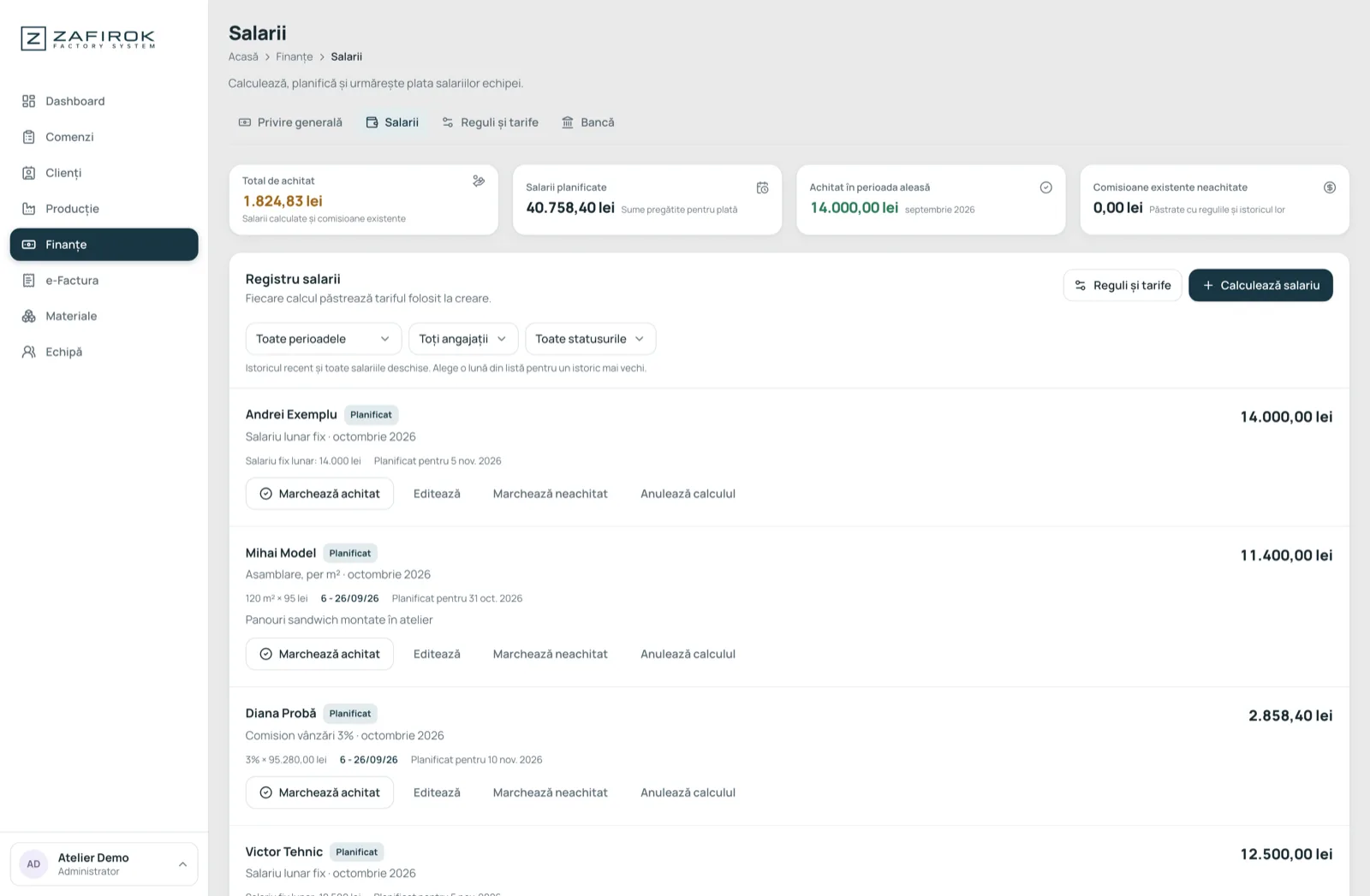
- In Finance → Payroll → “Rules and rates”, set up the levels (optional) and each employee's rule: “Fixed monthly salary”, “Hourly”, “By volume” or “% of order”. For “By volume” you name the unit, such as m² or pieces.
- At the end of the month, press “Calculate salary”, choose the employee and type in the quantity or hours; optionally, link the calculation to an order (for “% of order”, you choose the order the percentage is taken from).
- Choose “Plan salary” with a “Scheduled payment date”, or “Create unpaid salary”.
- On payday, press “Mark paid” and choose the date and method. The app creates the salary expense („Salariu”) in Finance.
- Follow the figures “Total outstanding”, “Planned salaries” and “Paid in selected period”.
How pay connects with client payments, expenses and the bank is covered in the guide to small business finance tracking. To make sure labour is priced in correctly, see also how to price a custom job.
Examples of house rules that prevent disputes
- Rates are written down and known to everyone, per type of job and per level.
- The unit and the way of measuring are the same for the whole crew.
- Quantities are confirmed by a named person before the calculation.
- Rework has a clear rule: who pays for it and how.
- Commissions have a clear payment trigger, for example full payment by the client.
- Payday is fixed and planned in advance.
- Any rate change is announced before the month in which it applies.
How Zafirok helps
- “Rules and rates”: per-employee rules (fixed monthly, hourly, by volume, % of order) and the Beginner, Intermediate and Advanced levels, with an hourly or per-unit rate.
- “Calculate salary”: quantities or hours typed in by hand, per month, optionally linked to an order.
- “Plan salary” with a scheduled date, or “Create unpaid salary”; “Mark paid” creates the expense in Finance.
- The figures “Total outstanding”, “Planned salaries” and “Paid in selected period”.
- In the furniture setup: automatic designer and manager commissions when the order enters technical design, and per-m² pay for the technologist and assembler. Details on the Payroll page.
Limits, plainly: quantities are typed in by hand; there is no automatic split across crew members; pay is not calculated automatically from tasks or production; salaries are not planned from the bank balance. The amounts are those calculated from your rules; deductions, taxes and contributions are set by your accountant.
The models and rates in this guide are examples: each company defines its own rules, levels, units and pay dates. If you prefer, the Zafirok team can set them up for you and help you get started: write to us via the contact page or create an account.
Payroll is part of the Finance and payroll add-on, which costs USD 5 per month.
Frequently asked questions
What is piece rate pay?
Pay based on the volume of work done: quantity times the rate per unit, for example m² installed × lei per m². It suits work that is easy to measure and to check.
Does Zafirok split the amount between crew members automatically?
No. The crew agrees on the split, and in Zafirok you type in each person's quantity, optionally linked to the order.
Is the commission calculated on money received?
No. “% of order” applies to the order value. You decide when it is paid, for example after full payment, and fix that date with “Plan salary”.
Can beginners and experienced staff have different rates?
Yes. The Beginner, Intermediate and Advanced levels each have their own rate, hourly or per unit.
Where can I find the legal rules on pay in Moldova?
The official text of the Labour Code of the Republic of Moldova is on legis.md (link in the sources). For how it applies to your company, including taxes and contributions, ask your accountant or a lawyer.