Equipment sales and service software, a CRM and ERP app, helps you tie together, in one order, the equipment sold, the installation or maintenance services, the date and time of each visit and the technician who does it. Tracking maintenance work runs most smoothly when every service has a date, a person and a place where you can see what needs doing today, tomorrow and over the next few days.
This guide is for companies working with air conditioning and ventilation, compressors, commercial kitchen equipment or other equipment sold with installation and service. You will see one way to organise the catalogue, orders and scheduling, which mistakes are common and what Zafirok does, including what it does not do.
In short
- A good starting point is a price catalogue for equipment and services, so quotes do not depend on a salesperson's memory.
- An order can have two parts: the equipment (with purchase and selling price) and the services (with duration, date, time and technician).
- One possible routine: each morning, check today's services, the unassigned ones and the past ones that are still open.
- Zafirok has no recurring maintenance schedules, warranty or serial-number tracking, or reminders; you can track future maintenance visits manually, with a rule of your choice.
Why a company needs CRM and ERP software for equipment sales and service
A shop sells and closes the sale. An equipment company sells, delivers, installs, commissions and comes back for maintenance visits or repairs. One order includes products, labour, travel and different people, sometimes on different days.
That is where the typical problems come from: the unit has arrived but the installation is not scheduled; the technician leaves without knowing which model they are fitting; nobody remembers the maintenance visit promised at the sale; the customer calls to ask when someone is coming.
The equipment and services catalogue
We recommend starting with a shared price list. For each piece of equipment: name, selling price and purchase price. For each service: name, price and duration in minutes, for example standard installation, commissioning, maintenance visit or diagnostics.
In Zafirok, the catalogue lives in Settings → Commercial → Rates (Setări → Comercial → Tarife). When you add a line to an order, the values are copied from the catalogue, and a later price change in the catalogue does not alter existing orders. The catalogue is a price list, not stock: it does not show how many units you have in the warehouse.
The order: equipment, services and delivery
A clear order usually answers four questions: what we sell, what work we do, when and who. In Zafirok, an order has equipment lines (quantity, purchase price, selling price) and service lines (quantity, price, duration, scheduled date and time, and who does it). The app calculates the totals.
The order also has a responsible person, who owns the customer relationship until the end, a delivery date and a delivery address. The default stages are Booked → Scheduled → In progress → Completed → Archive; the administrator can rename or add to them.
Hypothetical example with made-up prices: a company sells two air conditioners at €480 each (bought for €365 each) and adds two installation service lines, one per unit, at €90 and 180 minutes each, scheduled on the same day for two technicians. The order total is 2 × 480 + 2 × 90 = €1,140. The difference between selling and purchase price on the equipment is €230, before other costs. The prices are in euro because, for a company that keeps its books in Moldovan lei (MDL), the catalogue and orders are written in euro and payments are recorded in lei at the company's EUR rate (Settings → Commercial → Currency).
Scheduling services and the Planned services screen
In Zafirok, technicians are scheduled per service, not per whole order. Each service line has its own date and time and the person who does it, so one order can have delivery on one day, installation on another and commissioning later.
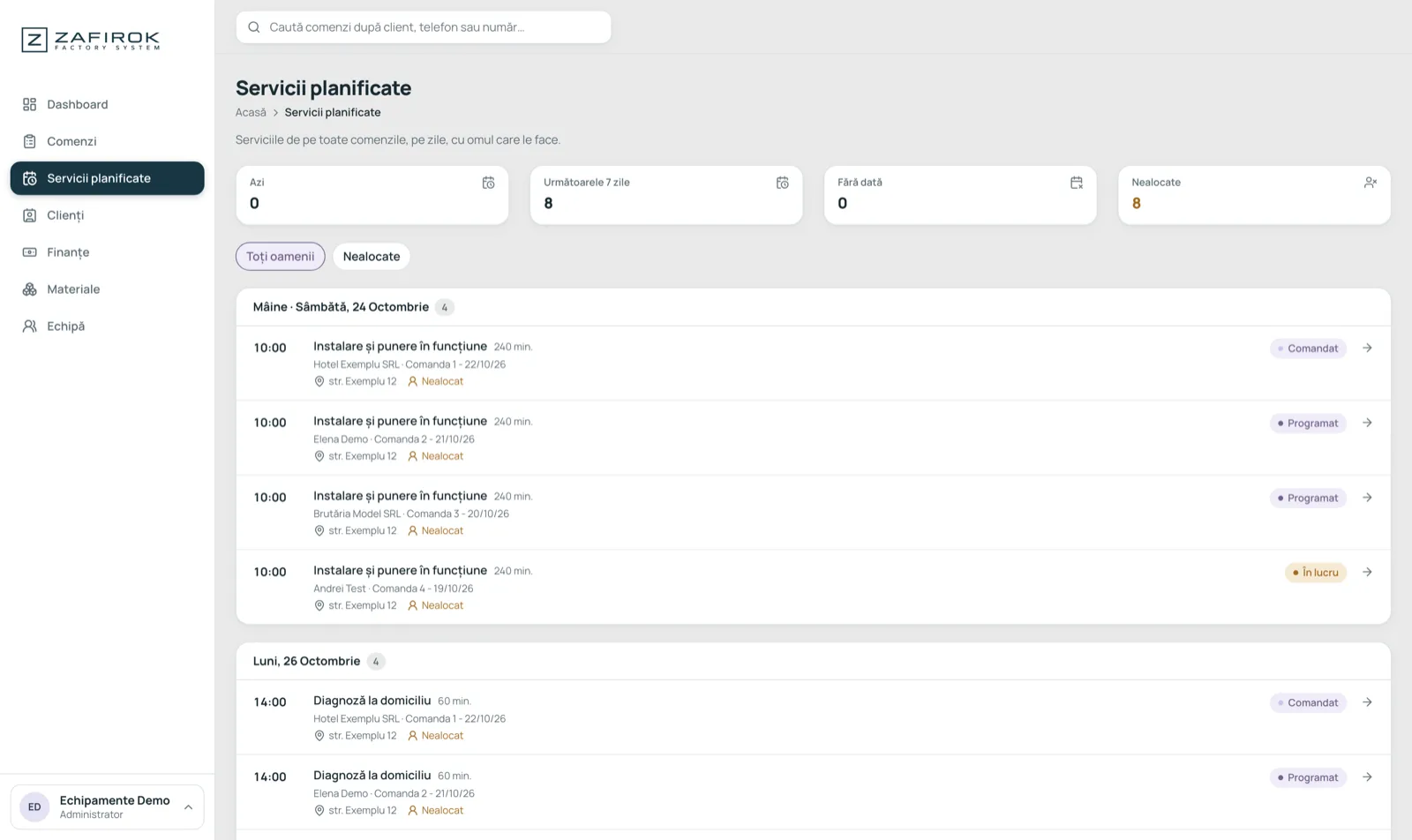
The Planned services screen (Servicii planificate) gathers the services of every order that is not yet in Completed or Archive and lists them by day: first “Past, still open”, then Today, Tomorrow and each following day by its date, and finally No date. The filters Everyone, Only mine and Unassigned, plus one filter per team member, show the whole team's plan, one technician's list or what has not been given to anyone yet.
An example morning routine you can adapt: check “Past, still open” (past-dated services on orders not yet completed), then Unassigned (what has no technician), then Today and Tomorrow. A single service cannot be ticked off as done, so we recommend moving the order to Completed once all its work is finished; otherwise its services stay under “Past, still open”. Technicians open their Only mine list on their phone; the app runs in the browser and can be installed from the browser on a phone.
Payments: deposit and balance
At many equipment companies, customers pay a deposit when they order and the balance after installation, but the payment structure is up to you. Each payment is recorded against the order in Finance → Payments (Încasări), with amount, date and status Paid or Unpaid.
A balance entered as an unpaid payment with the agreed date becomes a planned receivable and shows up right away in Alerts on the main dashboard as Receivable, with its due date, until you mark it Paid. The full method is described in our guide on tracking deposits and balances on orders.
Purchase and selling prices sit side by side on the equipment lines, so you can see your markup on each order. The purchase price on the line is for reference only: it is not counted as a cost in the order's profit. If the purchase comes with a supplier invoice, you can record it in Materials (Materiale), sending each line to the customer's order or to a warehouse.
Maintenance, warranties and serial numbers: what you track by hand
The app has no recurring maintenance schedules, does not track warranties or serial numbers and sends no reminders. You still do not have to keep maintenance visits in your head. A few practices you can use or adapt:
- The next maintenance visit as a service to schedule. When you close an installation, you can create a new order for the same customer with a maintenance service from the catalogue, and write the month it is due in the description. Leave the date empty until you agree it with the customer: the service appears in Planned services under No date. The service needs a price, because an order with a total of 0 cannot be saved.
- A monthly review of the list. For example, once a month, go through the services without a date, call the customers whose maintenance is due and fill in the date, time and technician.
- Warranty in the order description. You can note the warranty period and the installation date, and attach the warranty certificate to the order.
- Serial numbers in photos. One option: photograph each unit's rating plate, attach the photo to the order and also write the serial number in the description.
- A separate stage if you have many maintenance visits. In Kanban settings, the administrator can add a stage such as Maintenance to schedule and move it with the arrows right after Booked, so future visits do not mix with current orders. We recommend not leaving it where Add stage puts it by default, just before Archive: Planned services treats the last two stages (by default Completed and Archive) as finished and stops showing their services. New orders still start in the first stage, so move maintenance orders into their stage by hand.
Common mistakes in tracking maintenance work
- Prices quoted from memory, different from one salesperson to another.
- Installation written down as a note, with no date, time or technician.
- The order not moved to Completed after the last visit, or a postponed visit left on its old date: its services stay under “Past, still open” and the list no longer reflects reality.
- A maintenance visit promised at the sale and written down nowhere.
- The deposit received, but the balance left without a date.
Example checklist for an order with installation
- The customer and the delivery or installation address are checked.
- The equipment is added from the catalogue, with quantity and price.
- Every service has a date, a time and a technician.
- The delivery date is confirmed and fits the installation date.
- The deposit is recorded and the balance has a date.
- After installation, the rating plate photos and the warranty are attached to the order.
- After the last visit, the order is moved to Completed.
- The next maintenance visit is created as a service to schedule.
How Zafirok helps
Zafirok has a configuration for selling, installing and maintaining equipment. What you get:
- A catalogue in Settings → Commercial → Rates: equipment (name, selling price, purchase price) and services (name, price, duration in minutes); orders copy the values.
- Orders with equipment and service lines, totals calculated automatically, a responsible person, a delivery date and a delivery address.
- Default stages Booked → Scheduled → In progress → Completed → Archive, which you change in Kanban settings.
- The Planned services screen: services of orders still open, by day (“Past, still open”, Today, Tomorrow, the following days, No date), tiles for today, the next 7 days, no date and unassigned, and the filters Everyone, Only mine, Unassigned or one person.
- Payments per order, Receivable alerts for unpaid payments with their due date, and the Daily balance tab (Sold de zi).
- Materials: a supplier invoice is recorded line by line, and each line goes to the customer's order or to a warehouse.
- Photos and files attached to the order, up to 25 MB.
The catalogue, stages, checklist and routine in this guide are a starting model, not a rule. Each company sets up its own services and prices, stages, checklists and roles in Zafirok. If you prefer, the Zafirok team can set it up for you: write to us via the contact page or create an account.
What it does not do: no recurring maintenance schedules, warranty or serial-number tracking, or reminders, and the Rates catalogue does not hold stock. A single service cannot be ticked off as done: it leaves Planned services when the order moves to Completed. Fiscal invoices are not issued from Zafirok.
More details on the page Zafirok for equipment companies and on the Orders module page.
Frequently asked questions
Can I schedule periodic maintenance automatically?
No. Zafirok has no recurring maintenance schedules and no reminders. A practical option is to create the next visit as a service to schedule and review the services without a date regularly, for example every month.
Can I track warranties and serial numbers?
There are no dedicated fields. You can note the warranty in the order description and attach photos of the rating plates with the serial numbers and the certificates, so you can find them on the customer's order.
If I change a price in the catalogue, do old orders change too?
No. An order copies the catalogue price when you add the line, and later catalogue changes do not touch existing orders.
How do technicians see their work?
In Planned services, with the Only mine filter, on a phone or a computer. The app runs in the browser and can be installed from it, with nothing to download from an app store.
Can I issue invoices from Zafirok?
No. You issue fiscal invoices as before, for example in e-Factura. Zafirok's e-Factura module only reads received and issued invoices, as we explain in our guide to the e-Factura Moldova integration.