Looking for a Bitrix24 alternative for small manufacturers? The choice between Bitrix24 and an industry CRM comes down to fit and setup time, not “good” versus “bad”. If you want one platform for sales, tasks, internal communication and a website, and you have the time or a partner to set it up, Bitrix24 is a solid choice. If you need software that tracks workshop orders from day one, with production stages, deposits, materials and installation, a CRM built for your industry gets you there faster.
This comparison is written for small production and installation workshops: furniture, windows, gates, sandwich panels, modular houses. Information about Bitrix24 comes only from its official website, checked on 22 October 2026. As the industry CRM example we use Zafirok and say openly what it does not do. The general criteria are in our guide on how to choose a CRM for a small business in Moldova.
In short
- A universal platform gives you many tools, which you adapt to your process yourself or with a partner.
- An industry CRM comes with the process almost ready, but offers fewer tools outside its industry.
- For a workshop, the deciding questions are who sets it up, how long it takes and how the field team works on a phone.
- Bitrix24 has a free plan for 1–2 users and paid plans with a flat price per organization; the real cost also includes setup.
- A test on 5–10 real orders tells you more than a feature list.
Universal platform or industry CRM: what each means
A universal platform is built for any type of company: sales pipelines, tasks, communication, automation and an app catalog. Its value is breadth: almost any process can be modeled. The work is the setup: you define the stages, fields, rules and reports.
An industry (vertical) CRM starts from one specific trade. Stages, fields and screens are designed for that kind of work, so a company gets going faster. The flip side: if you need something outside that trade, it may not be there.
What Bitrix24 offers (checked on 22 October 2026)
Bitrix24 says on its website that it is used by more than 15 million organizations. Its strengths, as described on the official site:
- Breadth: CRM with sales pipelines and a contact center, marketing (email and SMS campaigns), tasks and projects (Kanban, Gantt, Scrum), chat and video calls, calendars, online documents, websites and stores, HR tools and the CoPilot AI assistant.
- Catalog: Bitrix24 Market lists more than 840 apps, with categories for import and export, banks, and ERP and accounting systems. According to the plan comparison on the pricing page, the Basic, Standard and Professional plans allow 2, 4 and 7 Market apps respectively and do not include the REST API; unlimited apps and the REST API come with the Vibe+ plans.
- Manufacturing: a dedicated page describes inventory for materials and finished goods (receipts, sales, transfers, write-offs, multiple warehouses), shift clock-in and clock-out, and shop-floor work reports.
- Customization: the Vibe+ plans include Vibecode, an AI app builder presented as needing no developers.
- Access: a free mobile app, desktop apps for Mac and Windows, and a cloud or On-Premise (self-hosted) version.
- Pricing: a Free plan for 1–2 users; paid plans with a flat price per organization and a user limit. In the Europe region, billed annually: Basic €49 per month for 5 users, Standard €99 for 50, Professional €199 for 100 (billed monthly: €69, €144 and €289).
- Implementation: the manufacturing page recommends a Bitrix24 partner for quick implementation, training, choosing a plan and customization.
How Zafirok helps: an industry CRM for workshops
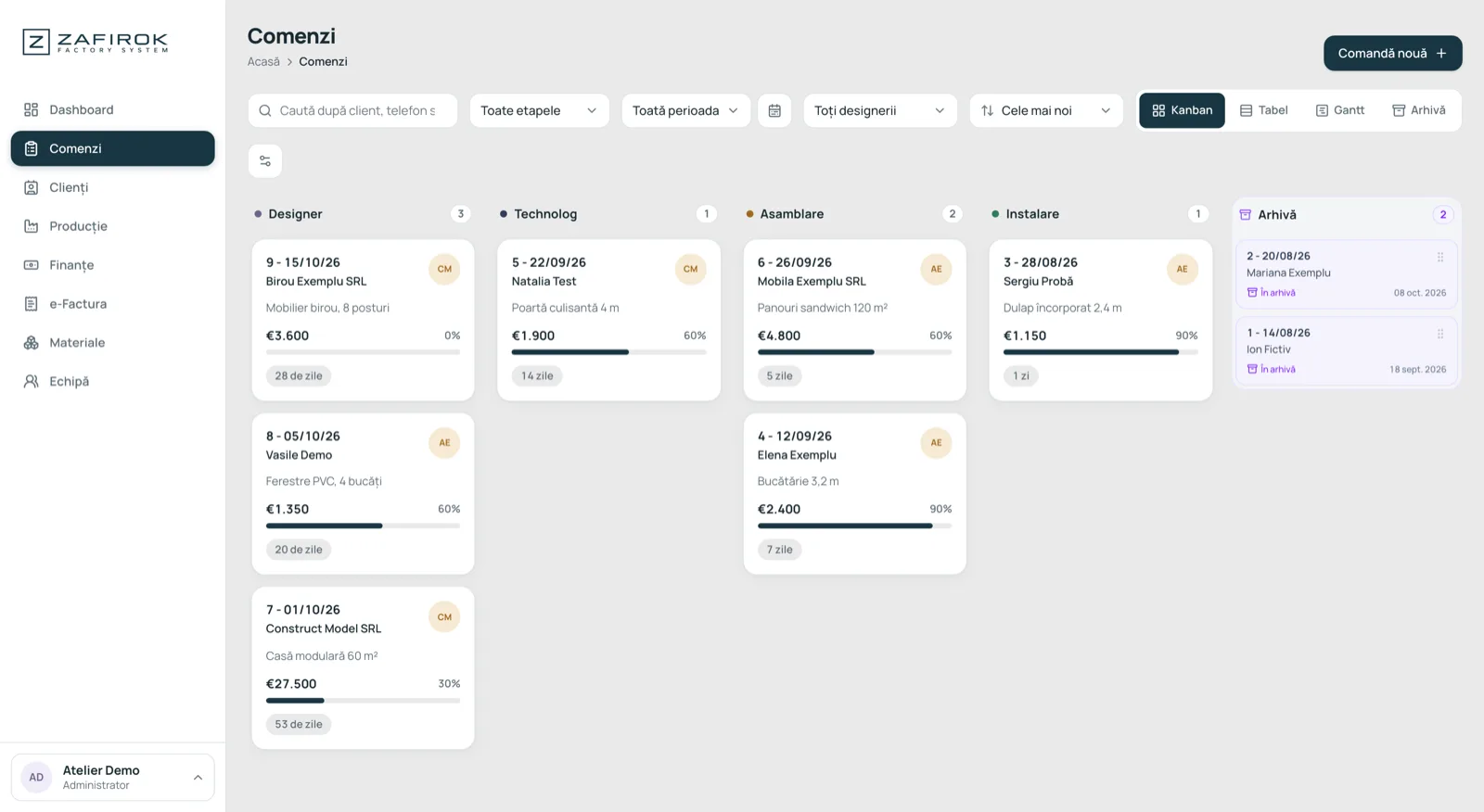
Zafirok starts from the workshop order. You choose your business set-up (for example Factories & production, Custom furniture, Windows or Gates & fences), and all of these set-ups start from the same workshop base, without trade-specific fields (dimensions and specifications go in the Description, Documents or checklists):
- Default stages Design → Technical design → Assembly → Installation → Archive, a model you rename and adapt, with Kanban, Table and Gantt views.
- Payment rules on the default stages: an order cannot leave Design before 60% is paid or leave Installation before 100% is paid; the rules follow the stage names, so you turn them off by renaming those stages if you work differently.
- On each order: Planning and Checklists (optional tools you switch on under “Tools”), Documents, Materials, Payments with a “60–30–10 payment plan”, Expenses, Commissions & m² and History; the side card shows profit, margin and the amount left to collect.
- Production: production jobs for an order or for stock, configurable flows, quality checks with a reason and photos, and recipes that consume stock when a job enters a stage (production jobs do not move the order's stage or touch its payments); more in our guide to small factory production software.
- Payroll: fixed monthly salary, hourly, by volume (for example per m²) or a percentage of the order; quantities are entered by hand.
- Moldova: e-Factura and statements from MAIB, ProCredit Bank and Victoriabank (Victoriabank is activated together with support), read-only: e-Factura invoices are not linked to orders, and bank transactions are matched by hand without changing the order's paid amount (payments are recorded in Finance); one automatic “order ready” SMS, sent through Zafirok or your own sms.md account.
- Field team: the same web app on a phone, with the interface in Romanian, Russian or English.
What Zafirok does not do: it has no website builder, email campaigns or emails to clients, no client portal, quote module, MRP or capacity planning, and no cash-flow forecast. Internal chat is marked “Coming soon”, and there is no app in the app stores. For these needs, a universal platform has more to offer.
The stages, checklists and roles above are a starting point: each workshop configures them to match the way it works. If you prefer, the Zafirok team can do the setup for you and help move your data: write to us via the contact page or create an account.
Bitrix24 or an industry CRM: where the difference shows
Time to the first correctly tracked order
On a universal platform you build the pipeline, fields, permissions and automation, then test them. Bitrix24 provides the tools and a partner network for this. In an industry CRM the stages and screens already exist as a model; you adjust names, roles and checklists, yourself or with the vendor's help.
Money per order
Workshops work with deposits, installments and balances due. In any tool, it is worth checking whether one order shows the contract value, what has been collected and what is left, and whether you can hold the order when the deposit is missing. On a universal platform such rules are configured, as far as your plan allows; in Zafirok they come as rules on the default stages, which you keep or turn off.
Materials and production
Bitrix24 describes inventory across multiple warehouses, connected to customer orders. In Zafirok you enter the supplier invoice in Materials (by hand or with “Scan”) and send each line to an order or to the warehouse; the “Material estimate” shows planned versus bought. The test question: can you see an order's real material cost without a separate spreadsheet?
Communication and sales
Here the universal platform is broader: internal chat, video calls, a contact center, websites, campaigns. As paid options, Zafirok has Facebook and Instagram messages in one inbox, website forms that land in Clients, and one automatic SMS when an order is ready.
Total cost
Bitrix24 charges a flat price per plan, which pays off when many people use it: the Bitrix24 Standard plan includes 50 users. Zafirok's base package (also called “Standard”) costs $9 per month, plus $10 for an industry module and $3 per active employee, as listed on the pricing page. Some of the features described above are paid separately, per month: Finance and payroll $5, Facebook and Instagram $10, Website forms $5, SMS packages from $5, e-Factura $5 and Bank $5. In both cases, factor in the time for setup and training; with Zafirok you can ask the team to help with the setup.
When Bitrix24 makes sense
- You want one platform for sales, tasks, internal communication and a website.
- You have many users, including colleagues who only collaborate on tasks, and the flat plan price works in your favor.
- You have someone in-house, or a partner, to configure and maintain the platform.
- You need catalog integrations or the API for systems you already use (the REST API and unlimited Market apps come with the Vibe+ plans).
- You want to keep your data on your own server with the On-Premise version, which is licensed separately from the cloud plans.
A Bitrix24 alternative for small manufacturers: when an industry CRM makes sense
- The order is the center of the work: measuring, design, production, installation, with a deposit and a balance due.
- The team is small and has no time for a setup project.
- Installers and drivers work from phones and need simple screens.
- Connections to Moldovan systems matter: e-Factura, statements from MAIB, ProCredit Bank or Victoriabank, SMS to local numbers.
- You want to see each order's material cost (in its Materials tab) and its profit and margin (calculated from the expenses recorded in Finance for that order) without building reports from scratch.
Decision checklist
- Write down, on one page, the path of a typical order from request to final payment.
- Mark what the tool must do in the first month and what can wait.
- Decide who will set up the tool (you, a partner or the vendor's team) and how many hours a week they have for it.
- Test the same 5–10 real orders in both tools, with the people who will use them.
- Measure how long it takes until an order shows stages, documents and payments correctly.
- Work out the 12-month cost for your real team: subscription, modules, setup, training.
- Usually the right choice is the tool your team managed to use on its own, without calling you at every step.
It is worth asking not what the software can do in general, but how long it takes until it does exactly what your workshop does.
Practical tip
Frequently asked questions
Is Zafirok an alternative to Bitrix24?
For workshops that track orders with production, installation and staged payments, yes: Zafirok covers this flow without setting it up from scratch. For internal communication, websites, marketing or a wide catalog of integrations, Bitrix24 offers more.
Does Bitrix24 have a free version?
Yes. On the pricing page, the Free plan is for 1–2 users and includes basic CRM (deals, contacts), tasks with Kanban and Gantt, shared calendars, chat and video calls and 5 GB of storage (checked on 22 October 2026).
Can Bitrix24 be used for manufacturing?
Bitrix24 has a dedicated manufacturing page with inventory, shift time tracking and work reports, and it recommends a partner for customization. In the plan comparison on the pricing page, worktime tracking and employee work reports are listed from the Professional plan up. Test on your own orders how close you get to your workshop flow and what the customization costs.
How do I move data from another CRM to Zafirok?
Clients are imported from CSV, TSV or XLSX (up to 8 MB and 2,000 rows per file) with column mapping and a preview before saving (this requires the Warehouse module). Orders cannot be imported in the app: the Zafirok team prepares their import on request; write to us via the contact page.
Sources
- Bitrix24 plans and pricing, Europe region – Free plan, prices, included users, Vibe+ plans and the feature comparison by plan: REST API, Market apps, worktime tracking and work reports (checked on 22 October 2026)
- Bitrix24 for manufacturing – inventory, time tracking, partners (checked on 22 October 2026)
- Bitrix24 Market – app catalog (checked on 22 October 2026)
- Bitrix24 On-Premise – self-hosted version and its licenses (checked on 22 October 2026)
- Bitrix24 apps – mobile and desktop apps (checked on 22 October 2026)
- Bitrix24 solutions – industry solutions, marketing tools, flat plan pricing, stated number of organizations (checked on 22 October 2026)
- Zafirok pricing (checked on 22 October 2026)